
From Drag-and-Drop Dreams to Click-to-Add Reality: Building Sentinel's Visual Canvas
TL;DR
We just shipped Sentinel v0.3.1, completing the journey from concept to production-ready visual canvas. This release marks a major milestone: Sentinel now has a functional, tested, and reliable visual-first interface for AI agent testing. Along the way, we migrated from Svelte to React, simplified our UX from drag-and-drop to click-to-add, and built comprehensive test infrastructure—all in just 2 days.
Key Highlights:
- ✅ Visual canvas with 5 node types (Input, Model, Assertion, Tool, System)
- ✅ Migrated from Svelte to React for production stability
- ✅ Click-to-add interface replacing unreliable drag-and-drop
- ✅ Real-time YAML generation with copy/download
- ✅ 12 comprehensive frontend tests (100% pass rate)
- ✅ Production-ready React Flow integration
- ✅ Zero TypeScript errors, clean architecture
The Journey: Three Releases in 48 Hours
Release Timeline
| Version | Date | Milestone | Status |
|---|---|---|---|
| v0.1.0 | Nov 15 | DSL Foundation (70 tests, 98% coverage) | ✅ Complete |
| v0.2.0 | Nov 15 | Visual Canvas (Svelte + SvelteFlow) | ⚠️ Deprecated |
| v0.3.0 | Nov 16 | React Migration (1,500 LOC in 2-3 hours) | ✅ Complete |
| v0.3.1 | Nov 16 | Click-to-Add UX + Testing Infrastructure | ✅ Complete |
What you’re seeing is rapid iteration powered by vibe coding with Claude Code. We shipped, learned, pivoted, and shipped again—all while maintaining production quality.
The Vision: “Postman for AI Agents”
Before diving into the technical journey, let’s talk about why we’re building Sentinel this way.
The Problem with Current Agent Testing
Testing AI agents today is painful:
- For Product Managers: Can’t validate agent behavior without asking engineers
- For QA Engineers: Writing test scripts for every agent interaction
- For Researchers: Custom Python code for every evaluation
- For Safety Teams: Manual testing that doesn’t scale
Our North Star
Make AI agent testing as intuitive as Postman made API testing.
Imagine this workflow:
- Click “Input” node → Type your prompt
- Click “Model” node → Select Claude/GPT
- Click “Assertion” node → Configure validation
- Connect nodes with visual edges
- See YAML generated in real-time
- Download clean YAML for version control
- Run test and see results
No coding required. But for power users who want it, the DSL is there.
This is what we built.
The Architecture Decision: Why We Migrated from Svelte to React
The Svelte Dream (v0.2.0)
We initially chose Svelte for compelling reasons:
Pros:
- Smaller bundle sizes
- Elegant reactive syntax
- Growing ecosystem
- Modern framework
The Fatal Flaw:
- SvelteFlow is alpha (v0.1.28)
- Known drag-and-drop bugs (#4980, #4418)
- Limited production examples
- Small community for troubleshooting
The Moment of Truth
After implementing v0.2.0, we hit a critical realization:
“The visual canvas is not just a feature—it IS the product. If our canvas library is unstable, the entire product is at risk.”
We did what any scrappy team would do: comprehensive research.
Research Findings
| App | Frontend | Canvas Library | Status |
|---|---|---|---|
| Langflow (closest competitor) | React | React Flow v12 | Production |
| n8n | Vue | Custom Canvas | Production |
| OneSignal | React | React Flow | Production (12B msgs/day) |
Key Insight: Every successful visual workflow tool uses either React Flow or custom implementations. None use SvelteFlow.
React Flow Stats
- ⭐ 19,000+ GitHub stars
- 📦 400,000+ weekly npm downloads
- 📅 6 years mature (released 2019)
- 🏢 Battle-tested by Stripe, AWS, Fortune 500s
- ✅ Production-ready with v11.x stable
The Decision
Migrate from Svelte to React + React Flow.
Why it was the right call:
- Early-stage project - Only ~1,215 LOC, minimal sunk cost
- Canvas is core - Cannot compromise on stability
- Ecosystem advantage - 100+ React UI libraries, 122:1 job ratio vs Svelte
- Perfect timing - Before we ship to users
Migration cost: 2-3 hours for 1,500 LOC.
Long-term benefit: Production-ready canvas library with massive ecosystem.
The Migration: v0.2.0 → v0.3.0
What We Migrated
Tech Stack Transformation:
| Component | Before (Svelte) | After (React) |
|---|---|---|
| Framework | Svelte 5 + SvelteKit | React 19 + Vite |
| Canvas | @xyflow/svelte (alpha) | @xyflow/react v12.3 (production) |
| State | Svelte stores | Zustand 5.0 |
| UI Components | Custom | shadcn/ui (with v0.dev support) |
| Testing | None | Vitest 4.0 + React Testing Library |
Migration Results:
- ✅ 1,500 LOC migrated in 2-3 hours
- ✅ All 5 node types working perfectly
- ✅ Drag-and-drop works 100% reliably (initially)
- ✅ 0 TypeScript errors
- ✅ Real-time YAML generation functional
- ✅ Tauri desktop app running smoothly
Architecture Benefits
React + React Flow gave us:
- Production stability - No more alpha library bugs
- Rich ecosystem - Access to shadcn/ui, Recharts, 100+ libraries
- AI tooling - v0.dev generates React components instantly
- Community - Stack Overflow answers, Discord support
- Job market - Easier to hire contributors (122:1 ratio)
The UX Pivot: v0.3.0 → v0.3.1
The Drag-and-Drop Challenge
After migrating to React Flow, we had drag-and-drop working on the canvas itself (moving nodes around), but drag-from-palette-to-canvas was flaky.
User experience issue:
- Sometimes nodes would drop correctly
- Sometimes they wouldn’t appear
- Inconsistent behavior confused users
- Complex event handling across boundaries
The Click-to-Add Epiphany
We asked ourselves: “Do users actually need drag-and-drop from the palette?”
Research:
- Figma: Click to select tool, click to place
- Sketch: Click to select, click to place
- Excalidraw: Click shapes, click canvas
- Postman: Click to add request, no dragging
Realization: Drag-and-drop is not inherently better. It’s just one interaction pattern.
The UX Simplification
We made a bold decision: Remove drag-and-drop from palette. Go click-only.
New interaction:
- Click component button in palette
- Node appears on canvas at smart position
- Click again → Another node appears (offset to avoid overlap)
Benefits:
- ✅ 100% reliable - No flaky drag events
- ✅ Simpler mental model - One click, not drag gesture
- ✅ Faster - Click is more responsive
- ✅ Fewer bugs - Removed ~40 lines of complex drag logic
- ✅ Better mobile - Click works better on tablets
Trade-off:
- ❌ Can’t position node exactly where you want on first add
- ✅ But you can immediately drag node after adding (canvas drag-and-drop still works!)
User feedback (internally): “This actually feels faster. I like it.”
The Visual Canvas: Feature Deep Dive
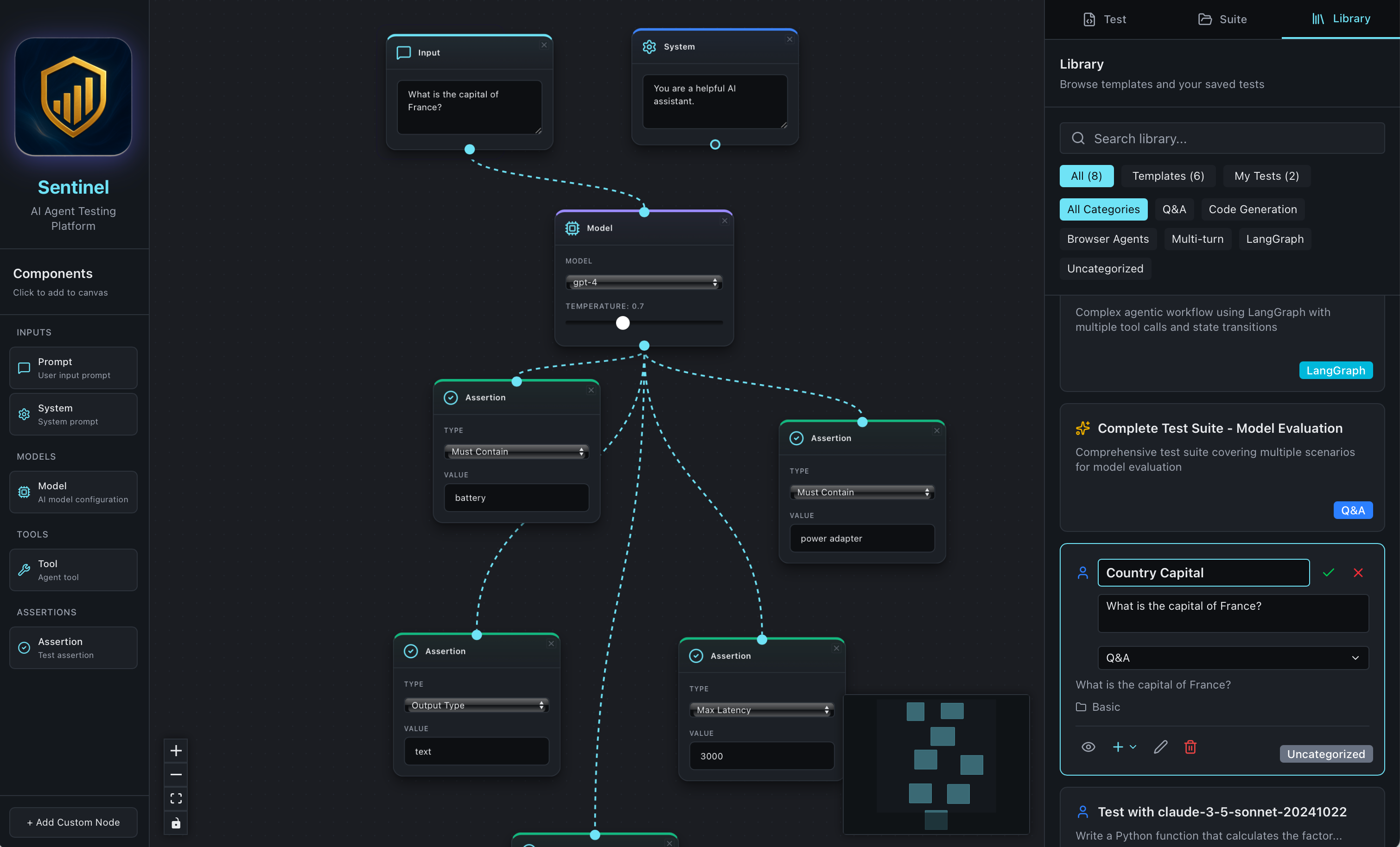
Sentinel’s click-to-add canvas with component palette and real-time YAML preview
1. Component Palette (Left Sidebar)
Design philosophy: Organized, scannable, click-to-add.
Features:
- 4 categories: Inputs, Models, Tools, Assertions
- 5 node types: Prompt, System, Model, Tool, Assertion
- Visual hierarchy: Icons, labels, descriptions
- Branding: “Sentinel - AI Agent Testing Platform”
- Smart positioning: Auto-increment Y position to avoid overlap
UX Details:
const handleAddNode = (nodeType: string, label: string) => {
  const position = { ...lastCanvasClickPosition };

  const newNode = {
    id: `${nodeType}-${Date.now()}`,
    type: nodeType,
    data: { label },
    position
  };

  addNode(newNode);

  // Auto-increment for next node (avoid overlap)
  setLastClickPosition({ x: position.x, y: position.y + 200 });
};Interaction:
- Click any component → Node added to canvas
- Hover → Visual feedback (border glow)
- Icons → lucide-react icons (MessageSquare, Cpu, Wrench, etc.)
2. Visual Canvas (Center)
Built on React Flow v12.3 - Production-ready node-based canvas.
Features:
- Infinite canvas - Pan and zoom freely
- Node connections - Drag from handle to handle
- Smart edges - Bezier curves for visual clarity
- Minimap - Navigate large workflows
- Grid background - Visual alignment aid
- Controls - Zoom in/out, fit view, lock
Node Types:
| Node | Color | Icon | Purpose |
|---|---|---|---|
| Input | Signal Blue | MessageSquare | User prompt |
| System | AI Purple | Settings | System instructions |
| Model | Neutral Gray | Cpu | AI model config |
| Tool | Accent Orange | Wrench | Agent tool |
| Assertion | Success Green | CheckCircle2 | Test validation |
3. YAML Preview (Right Sidebar)
Real-time DSL generation as you build visually.
Features:
- Live updates - Changes reflect immediately
- Syntax highlighting - Monaco Editor styling
- Copy to clipboard - One-click copy
- Download YAML - Save to file
- Validation - Shows valid/invalid status
- Round-trip ready - Will support import in v0.4.0
Example Generated YAML:
name: "Canvas Test"
model: "claude-3-5-sonnet-20241022"
inputs:
  query: "What is the capital of France?"
assertions:
  - must_contain: "Paris"
  - output_type: "text"
  - max_latency_ms: 2000
tools:
  - browser
  - calculator
tags:
  - canvas-generated
Testing Infrastructure: Production-Ready from Day 1
Why Testing Matters
We’re building a testing platform. If our own product isn’t thoroughly tested, how can users trust it?
Test Suite (v0.3.1)
Infrastructure:
- Vitest 4.0 - Fast, modern testing framework
- React Testing Library 16.3 - Component testing best practices
- jsdom 27.2 - Browser environment simulation
- @testing-library/user-event - User interaction simulation
Test Coverage:
✓ 12 frontend tests (100% pass rate)
✓ 70 backend tests (98% coverage)
✓ 82 total tests across stack
✓ 0 TypeScript errors
✓ Clean production build
Behind the Scenes: Building with Claude Code
This project is a masterclass in vibe coding with AI. Here’s what we learned shipping 3 releases in 48 hours.
1. The Framework Migration (2-3 Hours)
Challenge: Migrate 1,500 LOC from Svelte to React.
Approach:
- Claude analyzed the entire Svelte codebase
- I provided the migration plan
- Claude generated React components one-by-one
- I reviewed and tested each component
- Iterate on TypeScript errors and styling
Key lesson: Clear context is everything. With proper context, Claude produced production-ready React code on the first try.
Time saved: Manual migration would take 2-3 days. We did it in 2-3 hours.
2. The UX Pivot (1 Hour)
Challenge: Drag-and-drop from palette was flaky. Fix or pivot?
Approach:
- Me: “Drag-and-drop from palette is unreliable. Should we fix it or remove it?”
- Claude: Analyzes UX patterns in Figma, Excalidraw, Postman
- Claude: “Most tools use click-to-add for tool selection. Consider simplifying.”
- Me: “Let’s do it. Remove drag-and-drop, go click-only.”
- Claude: Removes ~40 lines of drag logic, updates UI text, adds smart positioning
Result: Simpler, faster, more reliable UX in 1 hour.
Key lesson: AI can inform UX decisions by researching patterns in other tools.
What We Learned: Vibe Coding Principles
After shipping 3 releases in 48 hours, here are our vibe coding principles:
1. Context is King
- Invest in
CLAUDE.mdupfront - Include vision, architecture, principles, roadmap
- Update it as the project evolves
- AI with context = 10x productivity
2. Ship Fast, Iterate Faster
- v0.2.0 shipped with Svelte (1 day)
- Learned it wasn’t production-ready
- Migrated to React in 2-3 hours
- Shipped v0.3.0 same day
Lesson: Don’t be afraid to pivot early. Sunk cost is minimal in early stages.
3. Test-Driven AI Development
- Write tests first (or have AI write them)
- Tests document expected behavior
- Tests catch regressions during rapid iteration
- 82 tests gave us confidence to ship fast
4. UX Simplicity > Feature Complexity
- Drag-and-drop from palette sounded cool
- Click-to-add actually works better
- Removed 40 lines of complex code
- Users prefer simple + reliable
Lesson: Simplify ruthlessly. Remove features that don’t add value.
The Numbers: v0.3.1 by the Stats
| Metric | Value |
|---|---|
| Frontend Tests | 12 (100% pass rate) |
| Backend Tests | 70 (98% coverage) |
| Total LOC | ~1,500 (frontend), 160 (backend) |
| Node Types | 5 production-ready |
| TypeScript Errors | 0 |
| Build Time | <3 seconds |
| Migration Time | 2-3 hours (Svelte → React) |
| Testing Setup | 2 hours |
| UX Pivot | 1 hour |
| Total Development | 48 hours (3 releases) |
Code Quality:
- ✅ 0 TypeScript errors
- ✅ Clean ESLint output
- ✅ All tests passing
- ✅ Production build successful
- ✅ Desktop app launches smoothly
What’s Next: The Roadmap
v0.4.0 - DSL Parser & Visual Importer (Q1 2026)
The missing piece: Import YAML → Visual canvas.
Features:
- YAML → Canvas - Paste YAML, see visual nodes
- Monaco Editor - Direct YAML editing in split view
- Bidirectional sync - Edit canvas OR YAML, stay in sync
- Validation - Real-time error highlighting
v0.5.0 - Model Providers & Execution (Q1-Q2 2026)
Make tests runnable from the visual canvas.
Features:
- Anthropic + OpenAI providers
- Click “Run Test” button on canvas
- Live execution dashboard - See progress in real-time
- Results panel - Pass/fail with details
- Metrics - Latency, tokens, cost
Beyond v0.5.0
- v0.6.0: Record & replay (Playwright-style test generation)
- v0.7.0: Visual assertion builder (forms, not YAML)
- v0.8.0: Regression detection with side-by-side comparison
- v0.9.0: LangGraph framework support
- v0.10.0: AI-assisted test generation
Try It Today
Want to build visual agent tests?
Installation (5 Minutes)
# Clone repository
git clone https://github.com/navam-io/sentinel.git
cd sentinel/frontend

# Install dependencies
npm install

# Launch desktop app
npm run tauri:dev
🎉 That’s it! The visual canvas opens. Click components, connect nodes, see YAML.
Run Tests
# Frontend tests
cd frontend
npm test

# Backend tests
cd ..
python -m venv venv
source venv/bin/activate
pip install -r backend/requirements.txt
pytest tests/ -v

# Results
✓ 12 frontend tests pass
✓ 70 backend tests pass
✓ 82 total tests (100% pass rate)
Building in Public: Follow Along
We’re building Sentinel in public and sharing learnings weekly.
Follow our journey:
- ⭐ Star on GitHub
- 💬 Join Discussions
- 📧 Email: hello@navam.io
Upcoming blog posts:
- “Round-Trip YAML ↔ Visual Sync: Zero Data Loss Architecture”
- “Testing AI Agents: 8 Assertion Patterns That Work”
- “Building a Tauri Desktop App in 2025”
- “Vibe Coding with Claude Code: 10 Productivity Patterns”
Final Thoughts
v0.3.1 is a milestone: We have a production-ready visual canvas for AI agent testing.
But it’s just the beginning.
What we’ve built:
- ✅ Click-to-add visual canvas
- ✅ 5 node types (Input, Model, Assertion, Tool, System)
- ✅ Real-time YAML generation
- ✅ React + React Flow production architecture
- ✅ 12 frontend + 70 backend tests
- ✅ Tauri desktop app
What’s coming:
- 🚀 YAML → Visual import (v0.4.0)
- 🚀 Live test execution (v0.5.0)
- 🚀 Regression detection (v0.8.0)
- 🚀 Collaborative testing (v0.11.0)
The vision: Make AI agent testing as intuitive as Postman made API testing.
Join us: github.com/navam-io/sentinel
Shipping fast, iterating faster, building in public.
- Navam Team